Mercedes GLE Dash Cam Install: Hidden Wiring Tutorial
Welcome to OhCar Magazine! Today, we're diving deep into a popular request: a comprehensive Mercedes GLE dash cam install hidden wiring tutorial. Many GLE owners want the peace of mind a dash cam offers without the unsightly wires cluttering their premium interior. This guide will walk you through the process, ensuring a clean, professional installation that complements your Mercedes-Benz.
Installing a dash cam might seem daunting, especially in a sophisticated vehicle like the Mercedes GLE. However, with the right tools, patience, and this step-by-step guide, you can achieve a seamless integration. We'll cover everything from choosing the right dash cam to routing the wires discreetly, making it look like a factory-installed feature. For those considering professional installation, our dash cam installation cost guide can provide valuable insights into pricing and what to expect.
Why Install a Dash Cam in Your Mercedes GLE?
The Mercedes GLE is more than just a vehicle; it's a statement of luxury and advanced engineering. Protecting this investment is paramount, and a dash cam plays a crucial role. Here's why it's a smart addition:
- Evidence in Accidents: In the unfortunate event of an accident, a dash cam provides objective video evidence, which can be invaluable for insurance claims and legal disputes.
- Protection Against Fraud: It can help protect you from staged accidents or fraudulent claims.
- Security While Parked: Many dash cams offer parking mode, recording activity even when the car is turned off, deterring vandalism and hit-and-run incidents.
- Capturing Memorable Moments: Beyond safety, dash cams can capture scenic drives and unexpected events on the road.
When considering a dash cam, remember to explore our extensive dash cam reviews to find a model that best suits your needs and budget. We've tested a wide range of devices from top brands, offering detailed performance analyses.

Tools and Materials Needed for Your Mercedes GLE Dash Cam Install
Before you begin your Mercedes GLE dash cam install hidden wiring tutorial, gather these essential tools and materials:
Essential Tools:
- Dash Cam: Choose a reliable dash cam, preferably one with a discreet design and good low-light performance.
- Wire Strippers/Cutters: For preparing power wires if hardwiring.
- Trim Removal Tools: Plastic pry tools are crucial to avoid scratching or damaging interior panels.
- Phillips Head Screwdriver: For any necessary panel removal.
- Zip Ties or Wire Clips: To secure wiring neatly.
- Electrical Tape: For insulating connections.
- Add-a-Fuse (Fuse Tap): Essential for hardwiring to the fuse box. Ensure you get the correct type (e.g., Mini, ATO, ATC) for your GLE's fuse box.
- Multimeter (Optional but Recommended): To identify constant and ignition-switched fuses.
- Needle-Nose Pliers: For manipulating wires in tight spaces.
- Small Mirror or Inspection Camera (Optional): To see behind panels.
Materials:
- Dash Cam Power Cable: Usually included with the dash cam.
- Optional: Rear Camera Cable: If your dash cam has a rear camera.
- Optional: Hardwiring Kit: Many dash cams come with a cigarette lighter adapter, but a hardwiring kit offers a cleaner look and enables parking mode.
Step-by-Step Mercedes GLE Dash Cam Install Hidden Wiring Tutorial
Let's get started with the installation. We'll focus on a clean, hidden wiring approach.
Step 1: Planning the Dash Cam Placement
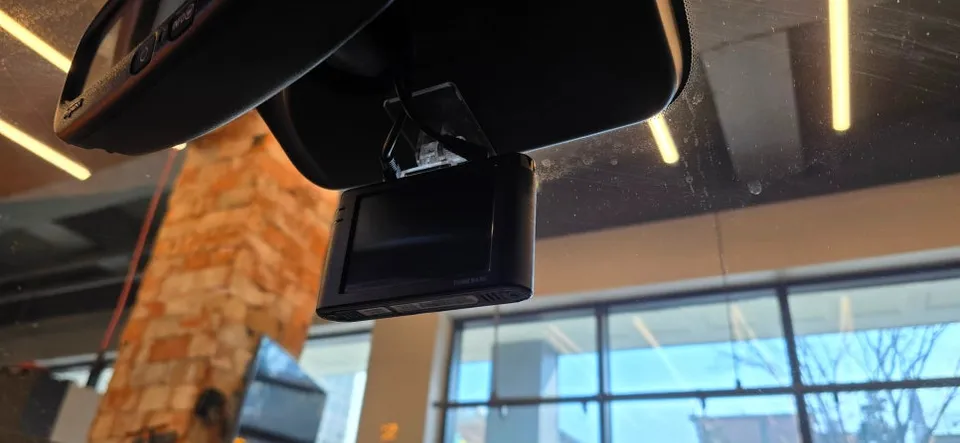
The ideal location for your dash cam is behind the rearview mirror. This position offers an unobstructed view of the road and is less conspicuous to potential thieves. Most dash cams are designed to be mounted on the windshield in this area. Ensure it doesn't interfere with the driver's line of sight or any sensors integrated into the windshield.

Step 2: Powering the Dash Cam - Hardwiring vs. Cigarette Lighter
While using the cigarette lighter adapter is the easiest method, it leaves a visible wire. For a truly hidden installation, hardwiring is the way to go. This involves connecting the dash cam directly to your car's electrical system via the fuse box.
Option A: Cigarette Lighter Adapter (Easier, Less Discreet)
Plug the adapter into the 12V socket, route the wire along the headliner, down the A-pillar, and tuck it under the dashboard to the dash cam. This is quick but leaves a visible cable.
Option B: Hardwiring (Recommended for Hidden Install)
This is the core of our Mercedes GLE dash cam install hidden wiring tutorial. It requires connecting to the fuse box.
Locating the Fuse Box
In most Mercedes GLE models, the primary fuse box is located on the driver's side, often behind a removable panel on the dashboard or under the steering column. Consult your GLE's owner's manual for the exact location. Some models may have additional fuse boxes in the trunk or engine bay, but for dash cam power, the interior fuse box is usually sufficient.
Identifying Fuses
You'll need two types of fuses: one that receives power only when the ignition is on (Switched/Accessory) and one that has constant power (Constant/Battery). This allows the dash cam to turn on with the car and, if equipped with parking mode, to continue recording when parked.
- Using a Multimeter: The most reliable way is to use a multimeter. With the ignition off, test fuses to find a constant power source. Then, turn the ignition on and test again to find a switched power source.
- Fuse Diagram: Your GLE's owner's manual or a sticker on the fuse box cover will have a diagram indicating which fuse controls which accessory. Look for circuits that are typically powered when the car is on (e.g., radio, power outlets) and those that are always on (e.g., interior lights, central locking).
Connecting the Hardwiring Kit
A hardwiring kit typically has three wires:
- Constant Power (usually Red): Connect this to a fuse that has constant power.
- Switched Power (usually Yellow): Connect this to a fuse that only has power when the ignition is on.
- Ground (usually Black): This must be connected to a bare metal surface in the car's chassis. Look for a bolt or screw that goes directly into the car's metal frame.
Using an Add-a-Fuse (Fuse Tap): This is the cleanest way to connect to the fuse box. Insert the original fuse for the circuit, then insert a new fuse (usually 2A or 3A, check your dash cam manual) into the add-a-fuse for the dash cam. The add-a-fuse will have a slot for the constant wire and a slot for the switched wire, depending on how you orient it.
Important Note: Always ensure the ignition is OFF before touching any fuses or wiring. When installing the add-a-fuse, orient it so the wire you want to be switched (usually yellow) is connected to a switched fuse slot, and the constant wire (usually red) is connected to a constant fuse slot.
Step 3: Routing the Power Wires
This is where the 'hidden wiring' aspect comes into play. The goal is to conceal all cables from view.
A-Pillar and Headliner
Carefully pry off the plastic cover of the A-pillar (the pillar between the front door and the windshield). Use your trim removal tools to avoid damage. Gently pull the pillar cover away from the frame. You might need to unclip it. Route the dash cam's power cable (or the hardwiring kit's wires) behind the pillar cover, tucking it upwards towards the headliner.

Once the wire is at the headliner, carefully tuck it into the gap between the headliner and the roof panel. Use a trim tool or your fingers to push the wire in. Work your way along the headliner towards the rearview mirror. Most headliners have enough space to hide wires easily.
Connecting to the Dash Cam
Bring the power wire to the dash cam's mounting location. Connect it to the dash cam. If you're using the cigarette lighter adapter, route that cable discreetly. If hardwiring, connect the power and ground wires to the appropriate terminals on your hardwiring kit, which then connects to the dash cam.
Step 4: Routing the Rear Camera Cable (If Applicable)
If your dash cam has a rear camera, routing its cable requires more effort but is crucial for a complete setup.
Through the Cabin and to the Rear
Route the rear camera cable from the dash cam, along the headliner, down the passenger side A-pillar, across the passenger side door sills, and finally to the rear of the vehicle. You'll need to remove the plastic trim pieces along the door sills to tuck the wire underneath.

Connecting to the Rear Windshield/Trunk
Carefully route the cable through the trunk lid or the rear hatch. Be mindful of moving parts and ensure the cable isn't pinched. The rear camera is typically mounted near the top of the rear windshield or on the license plate area. Consult your dash cam's manual for specific mounting instructions.
Step 5: Final Touches and Testing
Once all wires are routed and connected:
- Secure Wiring: Use zip ties or wire clips to secure any loose wires under the dashboard or behind panels to prevent rattling.
- Reassemble Panels: Carefully reattach any trim pieces you removed, ensuring they snap back securely.
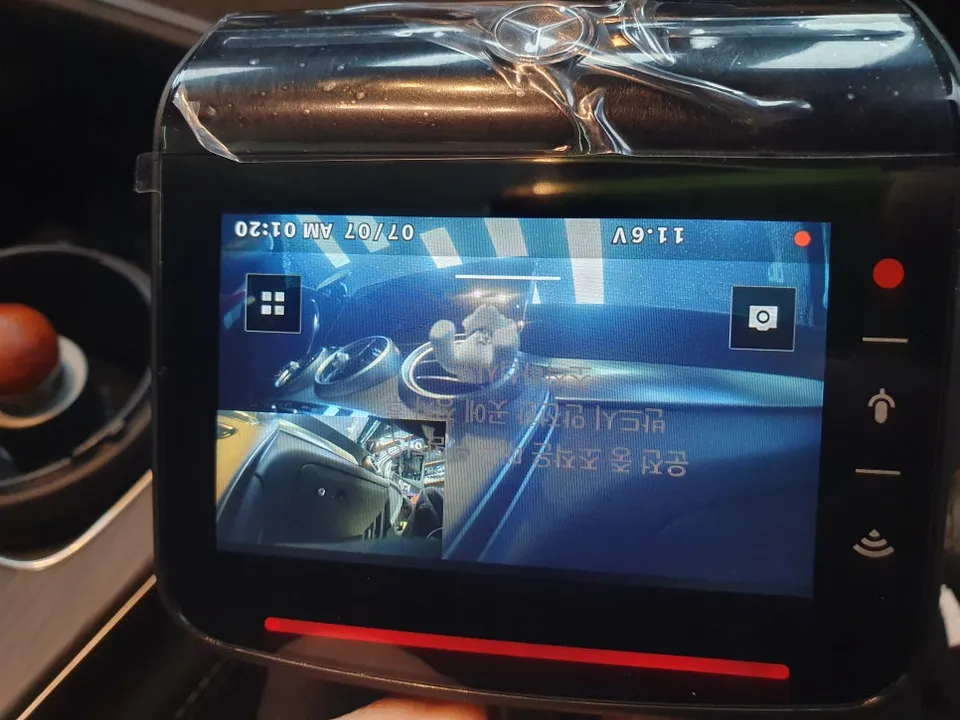
- Test the Dash Cam: Turn on the ignition. The dash cam should power up and begin recording. Check the display or app to confirm it's working correctly. Test both front and rear cameras if applicable.
- Check Parking Mode: Turn off the ignition and verify that the dash cam enters parking mode (if supported) or powers down completely as expected.

Advanced Considerations for Your Mercedes GLE
Your Mercedes GLE is equipped with advanced electronics and sensors. Here are a few extra tips:
- Avoid Sensor Interference: Ensure the dash cam and its wiring do not obstruct any cameras or sensors used for driver-assistance systems (e.g., lane keeping assist, adaptive cruise control). These are often located near the rearview mirror.
- Battery Discharge Protection: If using parking mode, ensure your dash cam has a voltage cutoff feature to prevent draining your GLE's battery. Many hardwiring kits include this.
- Professional Installation: If you're uncomfortable with any part of this process, especially working with your car's electrical system, consider professional installation. Our dash cam installation cost guide can help you budget for this service.
Dash Cam vs. Other Vehicle Protection Services
While a dash cam is excellent for recording incidents, it's just one part of comprehensive vehicle protection. At OhCar, we also review and recommend services like PPF (Paint Protection Film) and ceramic coating. These services protect your GLE's paintwork from scratches, chips, and environmental damage. For a detailed comparison, check out our PPF vs Ceramic Coating comparison. Tinting can also add privacy and reduce interior heat, complementing your dash cam's security features.
Conclusion
Completing a Mercedes GLE dash cam install hidden wiring tutorial successfully provides both security and a clean aesthetic. By carefully planning your installation and taking your time to route wires discreetly, you can enjoy the benefits of a dash cam without compromising your GLE's premium interior. Remember to consult your vehicle's manual and the dash cam manufacturer's instructions for specific details. For more insights and reviews on automotive tech and care, explore the OhCar Magazine.
Happy driving, and stay safe!
Comments (3)
Nice tutorial! I've been thinking about getting a dash cam for my RX, but I'm always a bit nervous about messing with the wiring. This makes it seem a lot less intimidating.
Man, I love PPF on my F-150, but I've never thought about doing it for my dash cam wiring. Might have to look into this for my wife's car, she hates seeing wires.
Man, I wish I'd seen this before I did my Tahoe. Had wires all over the place for a while until I figured out how to tuck 'em. Definitely makes a difference for the clean look.



Explore Related Services on OhCar